
Cohere allows the coaches to send automated SMS Reminders to clients enrolled on the services. Personalizing your SMS Reminders helps you stay connected with clients in a way that feels authentic and on-brand.
By customizing your SMS Reminders, you can make every message reflect your business personality.
🔧 How to Customize/Edit SMS Reminders
Step 1: Open Your Service Settings
From your Business Dashboard, click the name of the service you want to customize.
Then, navigate to the Emails and SMS tab inside that service.
Step 2: Customize/Edit Branding
On the Emails and SMS page, click the SMS Notifications button.
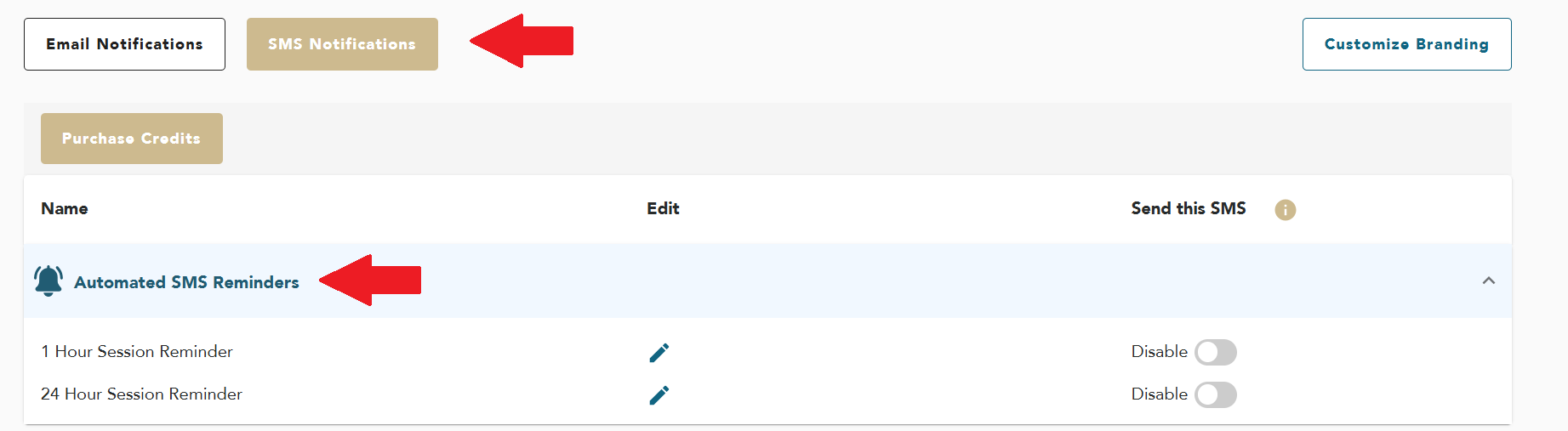
Step 4: Enable/Disable SMS Reminders
You can toggle on/off the buttons right next to each SMS reminder to Enable/Disbale the SMS reminders
Step 3: Save the Changes
Once you add the changes, click OK
🎉 You’ve successfully customized/Edited your SMS reminders to reflect your communication style!
💡 Need help?
If you get stuck or have questions, our team is here for you! Reach us anytime at support@cohere.live and we’ll get back to you quickly. 🚀
Comments
0 comments
Please sign in to leave a comment.